
The control mode of intelligent control system is divided into automatic mode and manual mode:
Automatic mode
Switch the "automatic/manual" switch on the PLC control cabinet panel to "automatic" to achieve automatic control. The automatic mode is a variable frequency speed regulation mode for fresh air operation, which belongs to the energy-saving and economic mode.
Manual mode
Switch the "automatic/manual" switch on the PLC control cabinet panel to "manual" to achieve manual control. You can start the 1 # -2 # power frequency fans from the control cabinet panel as needed, or input the starting frequency from the touch screen of the control cabinet to start the 1 # to 2 # variable frequency fans for variable frequency operation.
Note: Manual mode can only be used for equipment maintenance and testing purposes. Cannot operate unattended for a long time.
plc control cabinet
The main panel of the PLC control cabinet of the Zhitong control system is as follows:
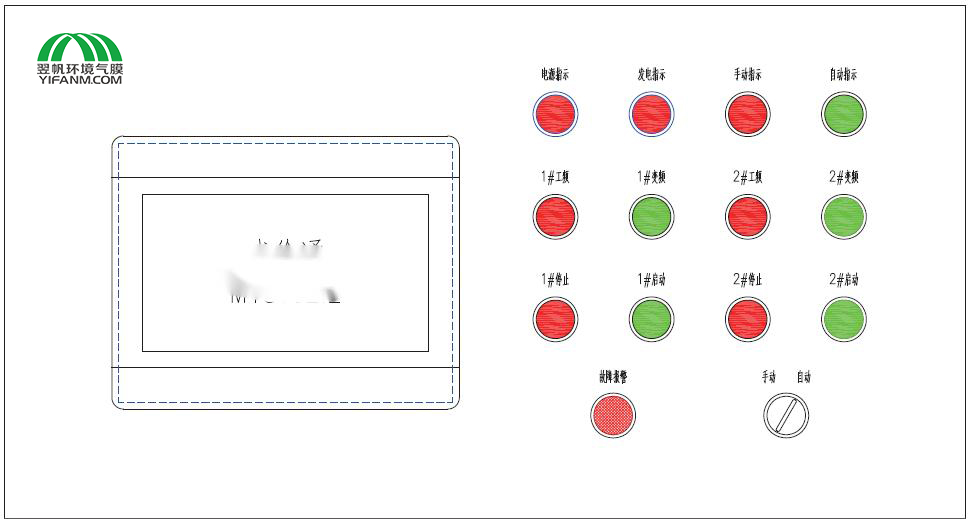
Main panel of control cabinet
The top row on the right side displays power indicators and equipment operating status indicators. From left to right are power indicator, power generation indicator, manual indicator, and automatic indicator.
The second row shows the operating status indicators of the fan, from left to right: 1 # power frequency (operating indicator), 1 # frequency converter (operating indicator), 2 # power frequency (operating indicator), and 2 # frequency converter (operating indicator).
The third row consists of the (power frequency) start and stop buttons for the fan in manual mode, from left to right: 1 # stop (power frequency), 1 # start (power frequency), 2 # stop (power frequency), 2 # stop (power frequency)
On the left side of the bottom row is the fault alarm indicator light, and on the right side is a three speed manual/automatic switching knob.
There is a 10 inch touch screen installed on the left side of the main panel. Except for manual control of the power frequency fan, most of the display and operation are completed through the touch screen.
The specific explanation is as follows:
Power indicator: When the control cabinet is powered on, the power indicator light lights up.
Power generation indicator: When the mains power is cut off and the generator starts, the power generation indicator light is on
Manual indication: When the control system switches to "manual mode" operation, the manual indicator light will light up.
Automatic indication: When the control system switches to "automatic mode" operation, the automatic indicator light will light up.
Fault alarm: When the pressure is too low, too high, the differential pressure gauge is disconnected, or there is a frequency conversion fault, the fault alarm light will flash and emit a buzzing sound. Please check the corresponding alarm information on the touch screen.
Manual/automatic switch: When the knob is turned to the left, the control system enters "manual" control mode, and the manual indicator light on the control cabinet lights up. When the knob is turned to the right, the control system enters "automatic" control mode, and the automatic indicator light on the control cabinet panel lights up. There is a neutral position between manual and automatic. When the knob is turned to the neutral position, the control system is in a stop state and will pause and shut down all running equipment.
Please refer to the detailed instructions below for the operation of the touch screen.
Note: Manual mode can only be used for equipment maintenance and testing purposes. Cannot operate unattended for a long time.
We Look Forward To Your Call And Consultation
Copyright @ Henan Yifan Environmental Technology Co., Ltd., 11th Floor, Future Business Building, Weisi Road, Jinshui District, Zhengzhou City豫ICP备18032537号-1
Site Map









 Online consult
 Telephone
 Cooperation
 Back to Top